
Quick Nav
- Why NLE choice still matters in professional post
- Review criteria for a professional NLE
- Where Avid Media Composer still excels
- How Premiere Pro, DaVinci Resolve, and Final Cut Pro compete
- Workflow pressure points that reveal the best choice
- Scope and limitations of this review
- Which NLE should you choose?
Why NLE Choice Still Matters in Professional Post
The real NLE decision does not happen when an editor is alone with a clean timeline and a good keyboard layout. It happens the first time that cut has to leave the editor’s machine and survive another person’s hands.
Assistant editorial needs to ingest, sync, build multicam groups, organize scenes, protect metadata, and keep versions readable. The editor needs rough cuts, producer revisions, and a locked cut that can be turned over without detective work. The mixer needs usable audio. The colorist needs picture references and source relationships. Finishing needs conform, exports, and an archive that can reopen later without rebuilding the job from memory.
That is the frame for this comparison. Avid Media Composer is being weighed against Adobe Premiere Pro, DaVinci Resolve, and Final Cut Pro from a professional post-production workflow perspective, not from a popularity contest.
A timeline can feel fast during a one-hour cutting exercise but fail the real test when an assistant has to relink camera originals, export an AAF with usable handles, and preserve source metadata for a mixer.
On short-form work, the gap between picture lock and delivery can sit inside a roughly 3- to 10-business-day finishing window. Episodic and feature work usually stretches the handoff longer. Either way, the software has to behave when the edit stops being private.
Review Criteria: What a Professional NLE Has to Handle
This review starts with repeatable workflow behavior. A feature-by-feature scorecard looks tidy, but it rewards visible tools and misses the jobs that tend to break under pressure.
The useful categories are plain: media management, shared project access, trim behavior, version handling, turnover exports, audio handoff, color round-trip, stability during long sessions, learning curve, and ecosystem fit. Those are the places where a training room, a post house, or a busy content team sees the difference between a comfortable interface and a durable workflow.
What the test project should include
- Camera originals plus proxies or optimized media.
- Externally recorded audio with source names that need to survive.
- At least one nested or compound sequence.
- Temp graphics and mixed frame-rate sources.
- A locked-cut turnover for audio and color.
For audio, the handoff should include an AAF or equivalent export with 24-frame or 48-frame handles, discrete dialogue, music, and effects organization, and a check that clip names and source references remain useful after export.
Field Note: The review prioritizes repeatable workflow behavior over feature checklists or marketing claims. That keeps the comparison closer to the work Video Symphony students are likely to face in assistant editorial, longform editing, and finishing-aware workflows.
Where Avid Media Composer Still Excels
Avid Media Composer still earns its place when the job depends on structure. Its strengths are not glamorous: bins, trim discipline, media databases, shared project logic, and longform reliability. In professional editorial, those are not minor details.
The bin-centric model fits the way assistant editors often think. Separate scene bins. Dailies organized by shoot day. Multicam group clips. Current cuts kept away from old versions. Turnover bins built for locked sequences. That structure matters when dailies arrive over roughly 5 to 20 shoot days and more than one person needs to understand the project without asking the editor what everything means.
Assistants tend to value Avid because it rewards careful habits. Consistent bin naming, controlled media locations, intact camera-source metadata, and disciplined versioning are easier to defend when the software itself expects that level of order.
Relinking is not magic in any NLE. Media Composer performs best when the team manages source metadata, reel or tape fields, and storage paths correctly from the start. Within that method, its media database logic remains one of the reasons scripted television, features, documentary series, and institutional training environments continue to teach it seriously.
For vendor-described features around the application, readers can compare the official language in Avid’s Media Composer product information with the workflow tests described here.
Bottom Line: Media Composer is strongest when the edit room values controlled organization more than quick improvisation.
How Premiere Pro, DaVinci Resolve, and Final Cut Pro Compete
The smarter question is not which tool replaces Avid. The better question is where each NLE makes the surrounding work easier.
Premiere Pro: Adobe-centered speed
Premiere Pro fits teams already living in Adobe workflows. Short-form campaigns, branded video teams, and mixed-format content groups often benefit from fast movement between editorial, temp graphics, review exports, and revisions. When client review cycles happen every 1 to 3 business days, that integration can matter more than a traditional bin culture.
Its risk profile changes when the project expands. A project that is safe for a single editor using local media may become risky when three editors need shared access, consistent bin ownership, clear version naming, and predictable archive recovery.
DaVinci Resolve: edit, color, audio, and finishing close together
DaVinci Resolve competes best when editorial, color correction, audio cleanup, subtitles, and delivery exports stay near each other in one workstation environment. It is a strong fit for teams that want fewer round-trips and a tighter relationship between the cut and the finish.
That does not make it automatically better for every editorial room. It changes where the complexity lives. Instead of handing off as often between applications, the team has to understand how Resolve’s project management, media paths, collaboration model, and page-based workflow affect the whole job.
Final Cut Pro: Mac-native assembly and library organization
Final Cut Pro remains fast for Mac-based solo editors, small teams, documentary shorts, and educational media where library-based organization and magnetic timeline behavior support quick assembly. It can feel unusually fluid when the hardware is consistent and the team accepts its organizing logic.
For facility-style handoffs, the question is less about editing speed and more about how the downstream departments expect to receive the job.
Workflow Pressure Points That Reveal the Best Choice
Software preferences become less interesting during failure testing. The edit system has to relink, revise, export, and reopen cleanly.
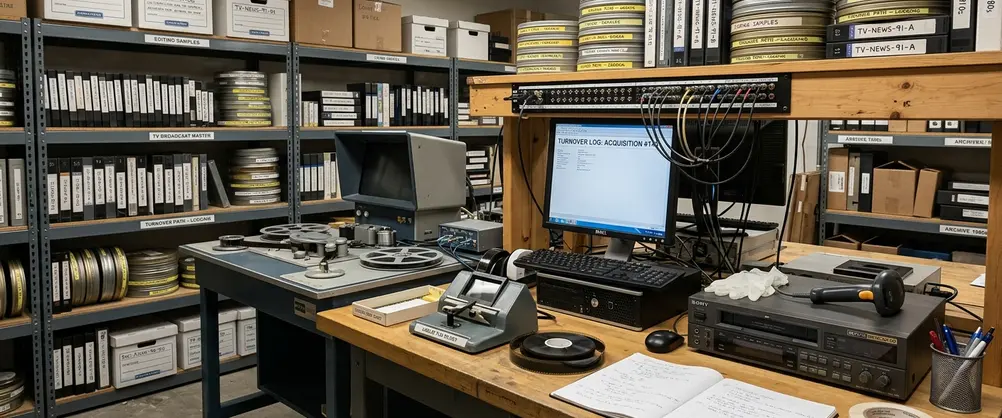
Test the relink before trusting the workflow
- Move proxy media offline.
- Reconnect to camera originals stored in a different folder path.
- Check source timecode, reel or tape metadata, clip names, and sequence references.
- Confirm that the sequence still points to the correct material without manual patchwork.
This is where casual media habits show up. Loose desktop folders, renamed files, and inconsistent proxy creation can punish any NLE. Avid tends to reward stricter setup. Premiere Pro and Final Cut Pro can move quickly, but the team must be deliberate about project structure and media location. Resolve can be clean when the database, storage, and conform expectations are planned early.
Test the audio handoff under real edit conditions
Use a locked 6- to 12-minute sequence with dialogue, room tone, music, effects, muted temp tracks, and at least two revisions of the same scene. Then export the handoff and inspect it in the mix environment.
An audio handoff may technically export but still be unusable if muted temp tracks, nested sequence audio, clip gain, or scene-based track organization do not translate cleanly into the mix environment.
Test revision and archive behavior
Export a dated cut. Make a producer revision pass. Then check whether changed shots, duplicated sequences, and obsolete temp elements are easy to identify. After that, reopen the project after about 10 to 30 days on a different workstation or user account and look for missing media paths, fonts or title elements, plug-ins, and external audio references.
Important: Solo timeline speed is only one part of the decision. Professional post also depends on controlled media paths, naming conventions, turnover discipline, and archives that do not collapse when the original editor is unavailable.
Scope and Limitations of This Review
This review is for professional post-production training and facility-style workflows. It is not buying advice for casual social editing, mobile-first production, live-stream control rooms, or beginner-only experimentation.
Software changes too often for minor interface differences to carry much weight. Quarterly or semiannual updates can move buttons, add panels, or adjust export behavior. The durable questions are steadier: Can the project be organized? Can it be shared? Can it turn over? Can it be reopened later?
Comparisons demonstrate the clearest patterns when the same workflow is tested across each NLE, but the conclusion still depends on the job. Facility standards, producer requirements, instructor preferences, and available hardware can override general recommendations. A class at Video Symphony’s 731 N. Hollywood Way training environment may emphasize one workflow because that is what a student needs for a particular post pipeline, not because every editor everywhere should use the same tool.
That distinction matters. Mike Flanagan, President of Video Symphony, has long treated software training as preparation for real rooms, not just menu memorization. The lesson carries from older tools such as Softimage 3D to modern NLEs: the application matters most when it connects cleanly to the next person in the chain.
Which NLE Should You Choose?
Choose by the work you are preparing for, not by the loudest software argument online.
Choose Avid Media Composer if your target is traditional post
Media Composer is the strongest recommendation for learners aiming at assistant editing, scripted post, longform projects, shared bins, scene-based organization, external sound handoff, and facility pipelines. It asks for discipline early and pays it back when the project becomes large.
Choose Premiere Pro if the Adobe ecosystem drives the job
Premiere Pro makes sense for editors embedded in Adobe workflows, especially content teams that need frequent client review exports, motion graphics integration, template-driven deliverables, and mixed-format production on short revision cycles.
Choose DaVinci Resolve if finishing needs to stay close
DaVinci Resolve is a strong choice when the user wants editing, color correction, audio work, subtitles, and final exports to stay inside one application environment. It fits editors who want to understand finishing, not merely send the cut away and hope it conforms.
Choose Final Cut Pro if speed and Mac-based simplicity matter most
Final Cut Pro belongs in the conversation for fast assembly, library organization, single-editor efficiency, and smaller production teams with consistent hardware. Its magnetic timeline can be a practical advantage when the project does not require a traditional facility handoff.
The smart comparison is not Avid versus everything else as a personality test. It is a workflow map. Follow the media, follow the handoffs, follow the archive. The best NLE is the one that stays understandable when the deadline gets close and the edit room stops being a solo exercise.




Your Thoughts
No comments.
Share Your Opinion