

Picture Lock Leaves Three Soundtracks to Deliver
The editor plays the locked sequence through the monitors. Dialogue sits above the music, effects land on the cuts, and the scene feels finished. Then the mixer asks for dialogue, effects, and music separately. The next task is to turn that combined playback into a clearly organized handoff.
In Final Cut Pro’s magnetic timeline, connected audio can shift vertically as clips and connections change. A lavalier recording may appear below an effect in one passage and above it in another. Screen position gives you a view of the edit; Audio Roles give each sound a persistent classification.
An Audio Role describes what a sound is, independently of its placement. That distinction carries the turnover through three checks: the role map defines destinations, component assignments determine what feeds them, and exported-file checks verify what the mixer actually receives.
Set the Delivery Agreement Before Creating Labels
Does the mixer need continuous category files, or clips they can edit individually?
A rendered dialogue stem combines selected dialogue into a continuous audio file. An editable handoff preserves clip-level timing and media relationships through an agreed interchange workflow. Those deliveries support different kinds of work, so settle the choice before building an elaborate role structure.
Final Cut Pro exports FCPXML rather than native AAF, so agree on a compatible conversion workflow with the mixer before exporting.
Get these requirements into a short written specification:
- Categories requiring separation, including any microphone or music subcategories.
- Rendered stems, editable clips, or both.
- Channel layout, sample rate, bit depth, and file format.
- Timeline start timecode and frame rate.
- Requested source-media handles for editable delivery.
Write settings explicitly: “stereo music stem, 48 kHz, 24-bit PCM WAV” describes a deliverable when those are the requested settings. Record the start as timecode, such as 01:00:00:00, together with its frame rate. Source handles provide material beyond individual cuts; leading silence in a continuous stem preserves timeline alignment.
Keep Dialogue, Effects, and Music as the Main Roles
Build the role map around the mixer’s requested files. Dialogue, Effects, and Music provide the main categories; subroles supply finer selections where the delivery calls for them.
Open the Timeline Index, select Roles, and choose Edit Roles. Review existing Audio Roles and assignments before adding labels. Keep spelling consistent throughout the library: choose Lav rather than alternating between Lav, Lavalier, and Radio Mic for the same source category.
| Main role | Subroles | Requested output |
|---|---|---|
| Dialogue | Boom, Lav | Combined dialogue or separate microphone-category files |
| Effects | Foley, Ambience | Combined effects or separate movement and environmental beds |
| Music | Score, Source | Combined music or separate score and in-scene music |
A parent role supplies a grouped destination, while its subroles support finer output selections. I keep that distinction visible when planning a turnover: every extra label should answer a delivery requirement. A request for one combined dialogue stem can stay simple.
Check Microphone Components Before Assigning Destinations
Consider a camera clip with a boom recording on channel 1 and a lavalier recording on channel 2. Inspect its channel configuration in the Audio inspector. When those channels contain independent microphone recordings, configure them as separate mono components, then assign Dialogue.Boom and Dialogue.Lav respectively.
For straightforward clips, select the clips and use the available Audio Role controls to assign their category. For multi-source clips, expand the audio components and inspect each component’s role and enabled state. A Dialogue label on the containing camera clip still leaves the component-level destinations to check.
Boom and Lav subroles can separate independently recorded sources; a recording that already combines both microphones requires delivery as that combined signal.
Use the Timeline Index to locate role members, display audio lanes, and audition the relevant groups. Audio lanes organize the timeline display. Output channel layout remains a separate delivery decision.
- Find music or effects carrying a Dialogue label.
- Check duplicate active microphone recordings while preserving intentional boom-and-lav combinations.
- Confirm that components intended to remain silent stay disabled.
Choose the Stem Export or Editable Interchange Path
What should leave Final Cut Pro: rendered category audio, or an editable sequence with accessible source recordings? Follow the agreed path and check its output on its own terms.
Render Separate Role Files
- Open Export File and choose the required audio settings.
- In the Roles controls, configure separate audio files using the requested role or subrole groupings.
- Confirm format, sample rate, bit depth, and channel layout against the specification. A Music role can feed a stereo file; the role name itself does not define channel count.
- Use the same project range and start reference for every category. Preserve leading silence when music or effects enter later.
Agree which editorial level changes, fades, EQ, and other processing should remain baked into the stems. Identify processing the mixer wants to recreate or receive separately before rendering.
Prepare FCPXML and Source Media
Export the agreed FCPXML version, provide accessible source recordings and requested handle media, and run the selected conversion workflow. Check media paths as part of packaging.
Before converting the full sequence, test an excerpt containing a microphone-source cut, an overlapping effect, a music fade, and processed dialogue. Inspect source-channel selection, timing, fades, and processing representation in the receiving workflow. Note processing that needs recreation.
Audition the Files Against the Locked Picture
Check the delivered package in a clean checking project or the receiving workflow. Listening to the exports makes the handoff itself the object of inspection.
- Verify file start references and durations, then align all stems to the shared reference.
- Audition dialogue, effects, and music separately.
- Confirm that the picture reference matches the delivered edit.
- Inspect converted editable media for missing sources, incorrect role mapping, unexpected channel assignments, and shifted clips.
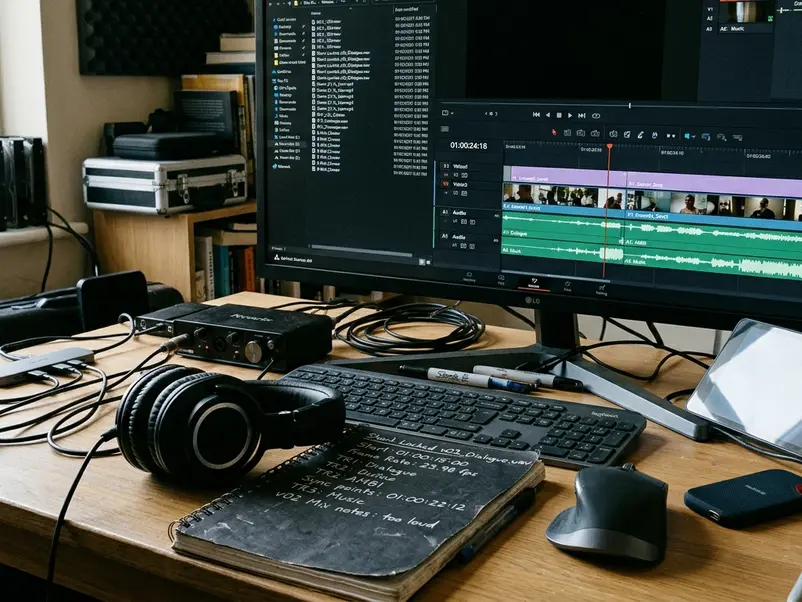
Use category-and-revision filenames such as ShortFilm_Locked_v03_Dialogue.wav, with the same edit identifier on the picture reference. Include concise notes covering delivery type, frame rate, start timecode, audio settings, role-to-file mapping, and intentional baked processing.
A dialogue component can move vertically in the magnetic timeline and retain its Dialogue role: its classification travels with the sound.








Your Thoughts
No comments.
Share Your Opinion